Integration Guide
/
Quick start
Quick start
This document is a Quick Start Guide designed to help your development team quickly test and integrate the MORI API.
You can find the full API specifications in the MORI API list, while this guide focuses on the core workflow.
Getting Started
The basic features are as follows:
Upload an image to the MORI S3 bucket and apply the Anti-AI Filter.
Fetch an external public image and apply the Anti-AI Filter.
Apply the Anti-AI Filter after uploading an image to the MORI S3 bucket.
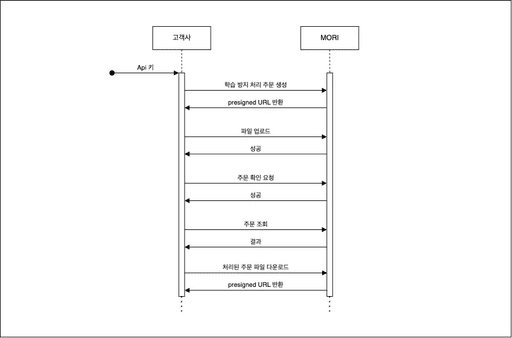
The diagram below summarizes the overall workflow for applying the Anti-AI Filter.
View details
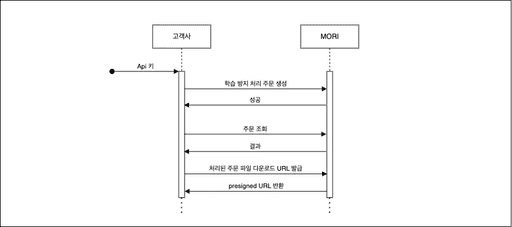
외부 퍼블릭 이미지를 불러와 Anti-AI 필터 적용
아래 다이어그램은 Anti-AI 필터 적용을 위한 전체 흐름을 요약한 것이에요.
View details
(Optional) Registering a Webhook Endpoint
You can register a webhook to receive processing results in real time.
Use this API to set the URL where notifications will be received.
POST
POST /api/v2/orders
Request Header
Key
Value
Remarks
Authorization
Beare
POST /api/v2/orders
{{
}}
X-Idempotency-Key
{{
Idempotency_Key
}}
It is recommended to use a UUID.
Request Body
Field
Type
Description
url
string
The webhook URL where notifications will be received
Response
Field
Type
Description
secret
string
Secret key for generating HMAC signatures
Idempotency Guarantee
All requests require an appropriate
Authorization
header.
X-Idempotency-Key
is required for certain APIs to prevent duplicate requests.
When the Anti-AI filter application is complete, a
ORDER.PROCESSED
event is sent via webhook.
Integration Guide
/
Quick start
Quick start
This document is a Quick Start Guide designed to help your development team quickly test and integrate the MORI API.
You can find the full API specifications in the MORI API list, while this guide focuses on the core workflow.
Getting Started
The basic features are as follows:
Upload an image to the MORI S3 bucket and apply the Anti-AI Filter.
Fetch an external public image and apply the Anti-AI Filter.
Apply the Anti-AI Filter after uploading an image to the MORI S3 bucket.
The diagram below summarizes the overall workflow for applying the Anti-AI Filter.
View details
외부 퍼블릭 이미지를 불러와 Anti-AI 필터 적용
아래 다이어그램은 Anti-AI 필터 적용을 위한 전체 흐름을 요약한 것이에요.
View details
(Optional) Registering a Webhook Endpoint
You can register a webhook to receive processing results in real time.
Use this API to set the URL where notifications will be received.
POST
POST /api/v2/orders
Request Header
Key
Value
Remarks
Authorization
Beare
POST /api/v2/orders
{{
}}
X-Idempotency-Key
{{
Idempotency_Key
}}
It is recommended to use a UUID.
Request Body
Field
Type
Description
url
string
The webhook URL where notifications will be received
Response
Field
Type
Description
secret
string
Secret key for generating HMAC signatures
Idempotency Guarantee
All requests require an appropriate
Authorization
header.
X-Idempotency-Key
is required for certain APIs to prevent duplicate requests.
When the Anti-AI filter application is complete, a
ORDER.PROCESSED
event is sent via webhook.
Integration Guide
/
Quick start
Quick start
This document is a Quick Start Guide designed to help your development team quickly test and integrate the MORI API.
You can find the full API specifications in the MORI API list, while this guide focuses on the core workflow.
Getting Started
The basic features are as follows:
Upload an image to the MORI S3 bucket and apply the Anti-AI Filter.
Fetch an external public image and apply the Anti-AI Filter.
Apply the Anti-AI Filter after uploading an image to the MORI S3 bucket.
The diagram below summarizes the overall workflow for applying the Anti-AI Filter.
View Details
Applying the Anti-AI filter to external public images
The diagram below summarizes the overall flow for applying the Anti-AI filter.
View Details
(Optional) Registering a Webhook Endpoint
You can register a webhook to receive processing results in real time.
Use this API to set the URL where notifications will be received.
POST
POST /api/v2/orders
Request Header
Key
Value
Remarks
Authorization
Bearer {{
POST /api/v2/orders
}}
X-Idempotency-Key
{{
Idempotency_Key
}}
It is recommended to use a UUID.
Request Body
Field
Type
Description
url
string
The webhook URL where notifications will be received
Response
Field
Type
Description
secret
string
Secret key for generating HMAC signatures
Idempotency Guarantee
All requests require an appropriate
Authorization
header.
X-Idempotency-Key
is required for certain APIs to prevent duplicate requests.
When the Anti-AI filter application is complete, a
ORDER.PROCESSED
event is sent via webhook.
Getting Started
Integration Guide